

Best Audio Interfaces for Vocal Recording & Home Studios (2026)
Last updated: March 2026
In This Guide
- Best Audio Interfaces (2026)
- Audio Interface Recommendations Explained (2026)
- What an Audio Interface Actually Does
- Critical Factors When Choosing an Audio Interface
- Best Audio Interfaces by Recording Workflow
- Understanding Interface Workflow in Real Recording Scenarios
- Audio Interface vs USB Microphone
- Example Audio Interface Setups for Vocal Recording
- Choosing an Interface for Long-Term Studio Growth
- Practical Recording Tips for Singers
- Common Questions About Audio Interfaces
- Conclusion
- Explore More Home Studio & Recording Guides
Compare audio interfaces for vocal recording, home studios, podcasting, streaming, content creation and professional production, with options for different recording workflows, input requirements and budgets.
Best Audio Interfaces (2026) – Top Picks for Vocal Recording & Home Studios
A curated selection of audio interfaces for vocal recording, home studios and professional production, chosen for clean preamps, stable performance and practical recording workflows.
Best Overall
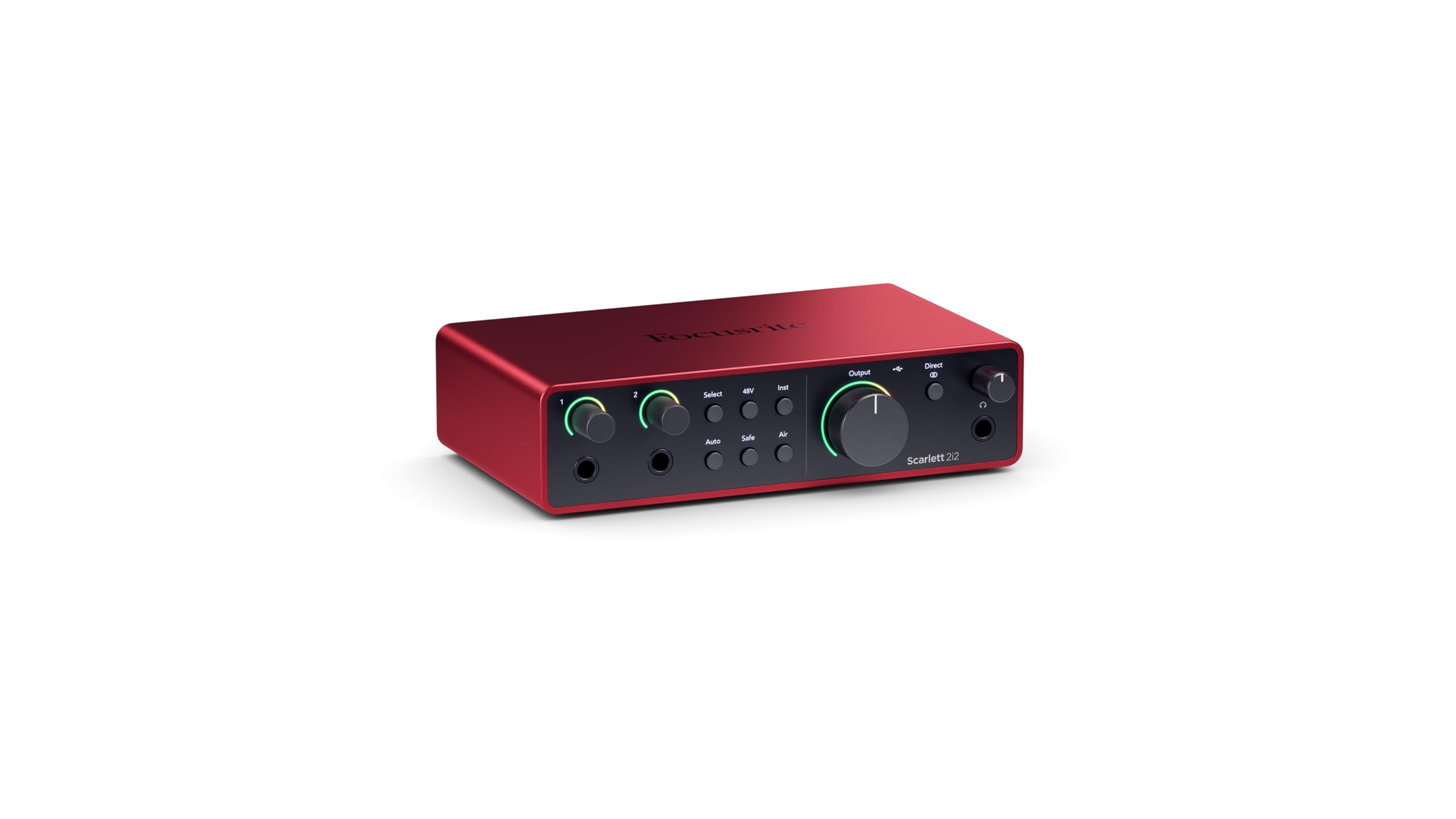
Focusrite Scarlett 2i2 — versatile two-input interface with clean preamps and reliable performance for vocal recording and home studios.
Best Budget
M-Audio M-Track Solo — affordable compact interface for basic vocal recording, practice and simple home setups.


Best for Beginners
Audient EVO 4 — simple 2-in/2-out interface with Smartgain for fast, consistent level setting.

Best for Professionals
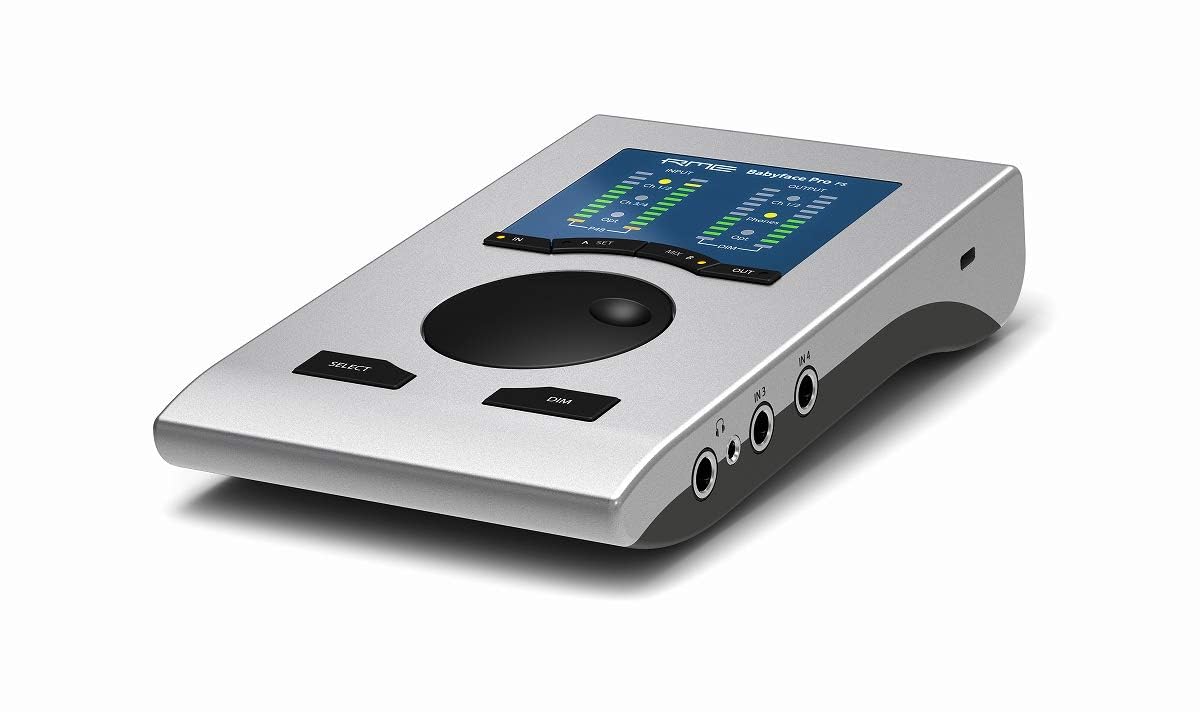
RME Babyface Pro FS — reference-grade conversion with highly stable drivers and low-latency monitoring for professional workflows.
Best for Small Rooms / Home Recording
Zoom AMS-24 — compact dual-input interface with flexible recording and monitoring options for home and mobile setups.

Recommended for Home Studios
Focusrite Scarlett 2i2 — dependable dual-input workflow
Audient iD14 MKII — expanded I/O with clean Class-A preamps
Recommended for Mobile Recording
Zoom AMS-22 — compact, travel-friendly interface
RØDE AI-1 — simple single-channel vocal recording setup
Explore more options on the Voice Shop Audio Interfaces page
In 2026, high-quality recording technology is more accessible than ever. The difference between entry-level and professional audio interfaces has narrowed significantly, yet workflow and recording quality still depend heavily on choosing the right unit for your setup. For singers, musicians, podcasters, voice artists and content creators, the audio interface can serve as the central hub of the recording chain.
An audio interface is more than a connector between microphone and computer. It determines how cleanly a microphone signal is amplified, how accurately audio is converted into digital data and how reliably you can monitor while recording — whether in a home studio, mobile setup or professional production environment.
This guide compares the best audio interfaces in 2026 based on real-world recording workflows rather than marketing specifications, helping you identify suitable options for vocal recording, music production, podcasting, streaming and professional audio work.
Rather than presenting a simple list of products, the guide organises audio interfaces by recording scenarios, workflow requirements and studio environments — from solo voice and home recording to mobile and professional multi-input production systems.
If you’re new to recording setups, start with my complete guide to audio interfaces to understand how they work and how to choose the right model. You can also explore my curated selection in the Voice Shop.
Audio Interface Recommendations Explained (2026)
If you want to understand the reasoning behind the recommended models, the following overview explains how different audio interfaces perform across real recording scenarios.
Quick Recommendation Summary
For most singers and home studios, a two-input USB audio interface provides the ideal balance of sound quality, reliability and simplicity. Models such as the Focusrite Scarlett 2i2 and Audient iD14 MKII remain among the safest and most widely trusted choices for vocal recording.
If You Want More Character
Users seeking a slightly more characterful analogue sound may prefer the SSL 2, which introduces subtle harmonic presence while maintaining clarity for vocals.
If You Prioritise Stability & Low Latency
Professionals working in demanding recording environments often choose the RME Babyface Pro FS, known for exceptional driver stability and extremely low-latency monitoring.
If You’re Building a High-End Studio
For singers and producers ready to invest in higher-end studio equipment, interfaces such as the Universal Audio Apollo Twin X, Apogee Symphony Desktop, and RME Babyface Pro FS provide advanced conversion quality, flexible monitoring, and long-term expandability. Some models also include onboard DSP processing for real-time recording effects.
What an Audio Interface Actually Does

An audio interface contains three key components:
Microphone Preamplifier – amplifies the microphone signal
Analog-to-Digital Converter – converts sound into digital data
Digital-to-Analog Converter – converts digital audio back to sound
Signal chain:
Microphone
↓
Interface preamp
↓
Analog-to-digital conversion
↓
Computer / DAW
↓
Digital-to-analog conversion
↓
Headphones or studio monitors
Critical Factors When Choosing an Audio Interface
| Technical Factor | What It Means | Recommended Benchmark | Why It Matters for Singers |
|---|---|---|---|
| Microphone Preamp Gain | Amplifies the extremely low microphone signal to recording level without distortion. | 58–65 dB gain range | Dynamic microphones often require higher gain. Insufficient gain introduces noise and weak vocal recordings. |
| Noise Floor (EIN) | Measures the amount of electrical noise produced by the preamp when amplifying quiet signals. | −128 dBu EIN or lower | Quiet passages, breath control and delicate phrasing remain clear without background hiss. |
| AD/DA Conversion | Determines how accurately analog sound is converted into digital audio and reproduced through speakers or headphones. | 110 dB dynamic range or higher | Captures the full dynamic range of the human voice, from soft passages to powerful high notes. |
| Driver Stability | Ensures reliable communication between the interface and your computer or DAW. | Low latency and stable performance | Prevents recording interruptions and ensures singers hear themselves in real time without distracting delay. |
Best Audio Interfaces by Recording Workflow
Solo Vocal Recording
Typical use:
• solo singers
• voice-over
• podcasting
Recommended models:
Focusrite Scarlett Solo — streamlined single-input interface with stable drivers and clean vocal capture for simple recording setups
Audient iD4 MKII — high-quality console-style preamp in a compact format, delivering detailed and transparent vocal recordings
Universal Audio Volt 1 — single-channel interface with subtle analogue warmth, ideal for adding character to solo vocal takes
Zoom AMS-22 — compact and versatile interface designed for quick, portable recording with straightforward controls
RØDE AI-1 — simple, reliable single-input interface with low noise and easy plug-and-play operation
M-Audio M-Track Solo — ultra-affordable entry-level interface suitable for basic vocal recording and practice
Apogee Boom — premium compact interface with refined conversion and studio-grade clarity for solo vocal work
Home Studio Singers & Vocal Coaching
Typical use:
• vocal lessons
• duet recording
• singer-songwriters
Recommended models:
Focusrite Scarlett 2i2 — dependable two-input interface with stable drivers and consistent vocal performance
Audient iD14 MKII — clean Class-A console-style preamps with expanded I/O for more flexible setups
SSL 2 — adds subtle analogue character while maintaining clarity for vocal recording
Universal Audio Volt 2 — warm, vintage-inspired tone with straightforward workflow for singers and creators
Audient EVO 4 — beginner-friendly interface with Smartgain for fast and reliable level setting
MOTU M2 — high-resolution converters with detailed metering and excellent low-latency performance
Recommended Audio Interfaces by Recording Situation
| Recording Situation | Recommended Interface | Why It Works |
|---|---|---|
| Solo vocal recording | Audient iD4 MKII | Clean console-style preamp. |
| Home studio singers | Focusrite Scarlett 2i2 | Reliable drivers and dual inputs. |
| Pop vocals | SSL 2 | Optional analogue colour. |
| Professional recording | RME Babyface Pro FS | Reference-grade conversion. |
| Mobile recording | Universal Audio Volt 1 | Portable design with character. |
Choosing the Right Audio Interface for Different Recording Scenarios
| Scenario | Recommended Interface Type | Why It Works |
|---|---|---|
| Solo Singer / Voice-Over | Single-channel desktop interface | Simple workflow and minimal setup. |
| Vocal Coach / Online Teacher | Two-channel interface with loopback | Allows microphones plus backing tracks. |
| Singer-Songwriter | Interface with Hi-Z instrument input | Records guitar and voice simultaneously. |
| Professional Vocal Recording | DSP-enabled interface | Real-time monitoring effects. |
| Mobile Recording | Bus-powered compact interface | Portable recording setups. |
Audio Interface vs USB Microphone
| Setup | Advantages | Limitations |
|---|---|---|
| Interface + XLR Microphone | Higher sound quality and expandable recording system | Requires additional equipment |
| USB Microphone | Very simple setup | Limited upgrade flexibility |
Example Audio Interface Setups for Vocal Recording
| Recording Scenario | Interface Character | Example Interfaces |
|---|---|---|
| Classical Voice | Transparent / Clean | RME Babyface Pro FS, Audient iD14 MKII |
| Pop Vocals | Analogue Character | SSL 2, Universal Audio Volt 2 |
| Voice-Over | Ultra-Low Noise | Audient iD4 MKII, Apogee Boom |
| Podcasting | Integrated creator tools | RØDECaster, Zoom AMS |
| Mobile Recording | Portable interfaces | Zoom AMS-22, Volt 1 |
Choosing an Interface for Long-Term Studio Growth
Consider: Buying an interface based on workflow rather than marketing ensures long-term reliability.
Practical Recording Tips for Singers Using Audio Interfaces
Understanding Interface Latency
Latency refers to the small delay between the moment a sound enters the microphone and the moment it is heard through headphones or studio monitors. Modern audio interfaces are designed to minimise this delay so that singers can monitor their voice comfortably while recording.
Most modern USB audio interfaces achieve latency between 5–10 milliseconds when using an appropriate buffer size. Many interfaces also provide direct monitoring, allowing singers to hear the microphone signal directly from the interface itself without passing through the computer.
USB vs Thunderbolt Interfaces
Most modern audio interfaces use USB connectivity, which provides more than enough bandwidth for typical recording situations. For singers, voice-over artists, and small studios, USB interfaces deliver reliable performance with low latency and excellent stability.
Thunderbolt interfaces offer higher bandwidth and are sometimes used in larger professional studios that require many simultaneous inputs and outputs. For most vocal recording setups, however, USB interfaces remain the most practical and widely supported solution.
Connecting an Audio Interface to Studio Monitors

Basic Home Recording Signal Flow
Basic recording signal chain for singers using an audio interface
        [ Microphone ]
              │
              ▼
      [ Audio Interface ]
              │
              ▼
        [ Computer / DAW ]
              │
              ▼
 [ Studio Monitors or Headphones ]
Practical Home Vocal Recording Setup
Typical home recording setup using an audio interface, DAW and studio monitoring system.
            [ Microphone ]
                  │
                  ▼
      ┌────────────────────────┐
      │     Audio Interface    │
      │ (Mic Preamp + A/D)     │
      └───────────┬────────────┘
                  │
                  ▼
           [ Computer / DAW ]
                  │
          ┌───────┴────────┐
          ▼                ▼
   [ Studio Monitors ]   [ Headphones ]
Professional Recording Signal Chain
Professional recording signal path showing microphone preamplification, digital conversion and monitoring.
            [ Microphone ]
                  │
                  ▼
        [ Microphone Preamp ]
                  │
                  ▼
   [ Analog-to-Digital Converter (A/D) ]
                  │
                  ▼
      [ Computer / Digital Audio Workstation ]
                  │
                  ▼
   [ Digital-to-Analog Converter (D/A) ]
                  │
                  ▼
        [ Monitor Controller ]
                  │
                  ▼
           [ Studio Monitors ]
For a detailed step-by-step explanation of microphones, audio interfaces, acoustic treatment and monitoring systems, visit the guide: How to Build a Home Vocal Studio (Complete Guide).
Studio Monitors in a Recording Setup
Most audio interfaces provide balanced line outputs designed to connect directly to studio monitors. Balanced TRS or XLR cables help minimise electrical noise and maintain signal clarity between the interface and the speakers.
For vocal recording, studio monitors should be positioned at ear height and placed symmetrically around the listening position. Proper monitor placement improves accuracy when evaluating recordings and adjusting microphone technique.
For a deeper explanation of speaker placement, room acoustics and how monitors influence vocal recordings, see our Studio Monitors for Recording, Mixing & Critical Listening Guide.
Gain Staging for Vocal Recording
Gain staging refers to setting the microphone preamp level so that the recorded signal is strong but not distorted. When recording vocals, the microphone preamp should typically peak between –12 dB and –6 dB inside the recording software.
This approach preserves headroom and prevents clipping while maintaining a clean and detailed recording. Proper gain staging is especially important for singers whose vocal dynamics can vary significantly between soft passages and powerful high notes.
Common Questions About Audio Interfaces
Simple Home Recording Setups
Do expensive audio interfaces sound better? Higher-end interfaces mainly improve reliability, headroom and monitoring flexibility rather than dramatically altering sound quality. Even affordable modern interfaces can deliver excellent vocal recordings when paired with a good microphone.
How many inputs does a singer need? Most singers need only one microphone input. A two-input interface allows recording with piano, guitar or a second microphone, which is ideal for home studio setups.
Is USB professional enough for recording vocals? Yes. Modern USB audio interfaces provide excellent sound quality and low latency, making them suitable for professional vocal recording, voice-over work and podcast production.
Advanced Home Studio Questions
What is latency in an audio interface? Latency is the small delay between the moment a sound enters the microphone and the moment you hear it through headphones or monitors. Good audio interfaces minimise latency and often provide direct monitoring to eliminate delay while recording.
Do I need phantom power for vocal recording? Yes if you are using a condenser microphone. Most audio interfaces include 48V phantom power to operate condenser microphones commonly used for studio vocals.
Should I connect studio monitors directly to the interface? Yes. Audio interfaces provide balanced outputs designed to connect directly to studio monitors using TRS or XLR cables. This ensures clean signal transmission and accurate monitoring.
Professional Studio Considerations
What makes professional interfaces different from entry-level models? Professional interfaces often offer better converters, lower noise preamps, more inputs and outputs, advanced routing options and extremely stable drivers.
Do professional studios still use standalone audio interfaces? Yes, although larger studios often use rack-mounted interfaces integrated with digital audio systems and external microphone preamps.
When should a singer upgrade their interface? Upgrading becomes worthwhile when recording requirements expand — for example when using multiple microphones, external preamps, or more advanced monitoring setups.
Conclusion
Modern audio interfaces have become remarkably powerful, compact and affordable. For singers, voice artists and small home studios, they provide everything needed to capture a clear and professional recording — including microphone preamps, digital conversion and reliable monitoring.
For most vocal recording setups, a two-input USB audio interface remains the most practical starting point. It allows a singer to connect a microphone and an additional instrument or second microphone while keeping the setup simple and portable.
When choosing an interface, it is worth paying attention to several factors:
clean microphone preamps, stable drivers, low monitoring latency and reliable connectivity with your recording software. Well-designed interfaces also provide balanced outputs for studio monitors and headphone monitoring for accurate vocal control during recording.
Singers building a home studio typically benefit from interfaces produced by established audio manufacturers, as these offer consistent driver support and dependable performance across different operating systems and recording environments.
For most singers recording at home, an interface with two microphone inputs, direct monitoring and balanced outputs provides the best balance of simplicity and sound quality.
Quick Recommendation: For most singers, a two-input USB audio interface provides the best balance of simplicity and sound quality. Look for low-latency monitoring, clean microphone preamps and balanced outputs for reliable home recording.
Explore More Home Studio & Recording Guides
If you are building a vocal recording setup, these guides will help you understand microphones, monitoring and home studio workflow in greater detail.
- How to Build a Home Vocal Studio (Complete Guide)
- Studio Monitors for Recording, Mixing & Critical Listening
- Best Condenser Microphones for Vocal Recording
- Best Dynamic Microphones for Vocal Recording
- Best Wireless Microphones for Stage & Performance


